
PDF to speech
PDF to Audio: Your PDF Read Aloud, Chapter by Chapter
PDF to audio that reads like a person would: running headers, page numbers, footnotes and citation marks are left out, two columns are read in order, and the document is split into chapters. You see the price first, then get an MP3 for each chapter and one MP3 with chapter marks.
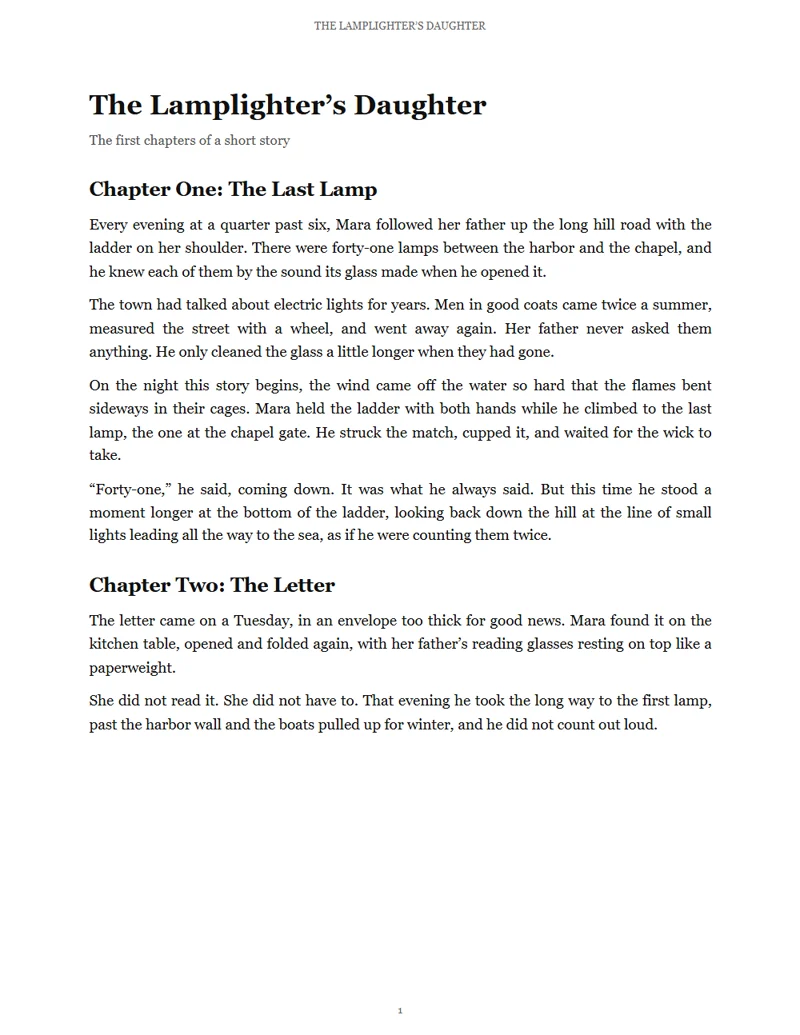
The Lamplighter’s Daughter
1 page · 1,565 characters · 17 credits
 Odette
What is read
THE LAMPLIGHTER’S DAUGHTER· Running headers and footers
The Lamplighter’s Daughter
The first chapters of a short story
Chapter One: The Last Lamp
Every evening at a quarter past six, Mara followed her father up the long hill road with the ladder on her shoulder. There were forty-one lamps between the harbor and the chapel, and he knew each of them by the sound its glass made when he opened it.
The town had talked about electric lights for years. Men in good coats came twice a summer, measured the street with a wheel, and went away again. Her father never asked them anything. He only cleaned the glass a little longer when they had gone.
Left out: Running headers and footers 1 · Page numbers 1
- uploads: the PDF stays on your device
- 0
- voices, narrators first
- 400+
- credits per 1,000 characters
- 10
- MP3 per chapter, plus one with chapter marks
- 1
- kinds of clutter left out
- 5
- characters from the sign-up credits
- 6,000
How do you convert a PDF to audio?
Open the PDF in the PDF to audio studio. It reads the text on your device, leaves out page headers, page numbers, footnotes, citation marks and references, and splits the document into chapters from its bookmarks or headings. Pick the pages, chapters and a voice, check the price, and press Read it aloud. Each chapter becomes an MP3, and the whole document one MP3 with chapter marks.
PDF to MP3 in three steps
Open the PDF, check what the PDF to audio studio will read, then listen and download.
Open your PDF
Drop it into the studio. The text is read on your device and the file stays there; only the words you choose are read aloud.
Check what will be read
Skipped parts are struck through, so you can see them. Choose pages and chapters, a voice and a speed. The price shows before anything is read.
Listen and download
Chapters are read a few at a time. Play each one, save it as an MP3, or save the whole document as one MP3 with chapter marks.
A PDF to audio converter that reads like a person
A PDF is laid out for the eye. Before anything is read aloud, the PDF to audio studio puts its words back in the order a listener needs and leaves the clutter out.

Headers, footnotes and citations left out
Running headers and footers, page numbers, footnotes, citation marks like [3] or (Walker et al., 2017) and the reference list are left out of the reading. They stay on screen struck through, and any of them can be read after all.
Two columns, read in order
Newsletters, briefs and papers set in two columns are read down the left column, then the right, instead of across the page. Words broken by a hyphen at the end of a line are joined again.
Chapters from bookmarks or headings
The PDF’s bookmarks become chapters when it has them; otherwise its headings do. Pick the pages and the chapters to read, and leave the rest.
An MP3 per chapter, and one with chapter marks
PDF to MP3, chapter by chapter: each chapter is its own MP3, named and numbered in reading order. The whole document is also one MP3 with chapter marks that many podcast and audiobook players let you jump between. That makes the studio a simple audiobook generator: the file is put together in your browser for no extra credits.
Follow along, word by word
Turn on follow-along before reading and each word lights up as it plays; every chapter’s subtitles (SRT or VTT) save from the player. It starts off for long documents; the reading itself is the same either way.
The price before you read
The PDF to audio studio counts the characters it will read and shows the pages, the credits and about how long the audio plays before anything starts. Each chapter, and each part of a long one, is priced on its own and rounded up to whole credits. Reading the PDF, cleaning it and making the file with chapter marks cost nothing.
PDF to audio samples
Each document was written for this page, set as a real PDF and read by the PDF to audio studio: the first page as it looks, what was left out struck through, its chapters, and the reading with each word lit as it plays.
PDF to speech guide: what reads well and how
Which PDFs read well
A PDF made from a word processor, a website or a typesetting program has its text inside, and goes from PDF to audio cleanly. You can tell by trying to select a word: if it highlights, the studio can read it.
A scanned page is a picture of text. Run it through a scanner app that recognizes text first, then open the new PDF here. Tables, formulas and code are read as plain words: untick the chapter that holds them, or paste your own summary into Text to Speech.
What the studio leaves out, and why
Clutter that helps a reader find their way on paper only gets in the way when you listen: the book title at the top of every page, the page number at the bottom, the [12] after a sentence, a footnote in small type, a list of references.
- 1Running headers and footers: text that repeats at the top or bottom of the pages.
- 2Page numbers: “7”, “Page 7”, “7 of 40”, roman numerals.
- 3Footnotes: small type low on the page, from its marker on.
- 4Citation marks: [3], [3, 4], (Walker et al., 2017) and superscript numbers.
- 5References: the section titled References or Bibliography, up to the next heading of the same level.
To have one read after all, untick it under Left out in the studio’s settings.
Listening to research papers
Turned from PDF to audio, a paper is easiest to follow without its citations, so they are left out by default; the reference list is too. Keep the abstract and the conclusion, and choose the sections you need from the chapter list: a twenty-page paper rarely needs to be heard end to end.
For a dense paper, turn on follow-along before you start: each word lights up as it is read, and you can tap a word to jump to it.
Books and long documents, chapter by chapter
A book is read as chapters, a few at a time, so you can start listening to the first while the rest are read. Each chapter is its own MP3, numbered in reading order, and the whole book is one MP3 with chapter marks.
A document with no bookmarks or headings is read as one chapter; to split it, read it in page ranges. The price shows before reading starts, and a part that can’t be read gives its credits back.
The right speed for studying
For study notes, try 0.9×: the study notes sample on this page is read at that speed, a little slower than normal speech, with a pause after each heading. For a novel, 1× keeps the narrator’s own rhythm; for a report you already know, 1.1× or 1.2× gets you through faster.
Listening instead of reading
PDF to speech helps when reading is hard or your eyes need a rest: on a walk or a commute, while cooking, or for anyone who finds long pages tiring. Pick a voice you find easy to listen to and keep it for the whole document.
What people turn into audio
From study notes to novels: PDF to audio for any document with text inside.
Study notes and textbooks
Listen to the week’s notes on the way to class, a little slower than normal speech.

Research papers
Hear a paper without its citations and references, section by section.

Novels and short stories
Read a book chapter by chapter in one steady narrator voice.
Reports and newsletters
Two-column briefs and reports read in order, for the commute.

Recipes and manuals
Step by step, read aloud while your hands are busy.

Guides and booklets
A how-to booklet read chapter by chapter, so your eyes can rest.
PDF to audio FAQ
More AI voice tools

Turn your PDF into audio
Open it in the PDF to audio studio, see what will be read and what it costs, and listen chapter by chapter.