How to Transcribe Audio to Text: 3 Ways That Work
How to transcribe audio to text by hand, with built-in captions or with AI: the time and cost of each, real numbers from our samples, and 30 free minutes.
Audio AI Studio8 min read
On this page
- Quick answer: which way to transcribe audio
- How long transcribing by hand really takes
- Free built-in captions and dictation
- How to transcribe audio with AI, step by step
- Can you transcribe audio to text free?
- If your audio is inside a video
- Record audio that transcribes cleanly
- Which export format to choose
- Consent and accessibility
- FAQ
- Transcribe your first recording with Audio AI Studio
There are three ways to learn how to transcribe audio to text: type it yourself, let a built-in caption or dictation feature listen along, or upload the file to an AI transcriber that labels the speakers and times every word. Typing is free but slow, built-in captions are free but rough, and an AI transcriber gets you an editable transcript in minutes.
To see what that means in practice, we ran the nine sample recordings on our transcriber page through it: a podcast, a meeting, a lecture, a phone call, a Spanish interview and a Chinese vlog among them, voiced by our library voices with room and street sound added. The English speakers talked at 127 to 166 words a minute, and the Chinese vlog at 255 characters a minute. At that pace, one minute of audio already holds more text than most people type in two or three minutes.
Quick answer: which way to transcribe audio
| Method | Cost | Time for your effort | Speakers and timestamps | Best for |
|---|---|---|---|---|
| Type it by hand | Free | Several times the length of the recording | Only what you add yourself | A few minutes of audio, or very hard audio |
| Built-in captions or dictation | Free | Real time, for live captions and dictation | Usually missing | A rough draft of one clear voice |
| AI transcriber | Credits per minute | A few minutes, plus a read through | Both, on every word | Meetings, interviews, lectures, subtitles |
If you only need a rough idea of what was said, any free option will do. If you need quotes, names, subtitles or who said what, start from an AI transcript and spend your time checking it instead of typing it.
How long transcribing by hand really takes
Transcribing by hand means playing a few seconds, pausing, typing, and playing again. It is free and you control every word, but the numbers add up fast.
Our sprint planning sample is 1 minute 47 seconds long and holds 268 words from four speakers. If you type 40 words a minute, the typing alone takes 6.7 minutes, close to four times the length of the recording. That is before you replay unclear words, work out who is speaking or write down any times.
If you do transcribe by hand, these habits save the most time:
- Slow the playback down to about three quarters of normal speed, so you can type without stopping as often.
- Work in short loops of five to ten seconds, and replay a loop instead of scrubbing back and forth.
- Write speaker names as initials while you type, then replace them with full names at the end.
- Mark anything you cannot hear with the time, such as [inaudible 03:12], and come back to it once.
Free built-in captions and dictation
Many video platforms make automatic captions for the videos you upload, and most phones and computers have dictation or live caption features. They cost nothing, and for one clear voice they can give you a usable first draft.
They also have limits worth knowing before you rely on them:
- Dictation and live captions listen in real time, so an hour of audio takes an hour to play through.
- Most of them write one stream of text with no speaker labels.
- Getting the text out can be awkward: some only show captions on screen, and export options vary from one platform to the next.
- A video often has to be uploaded and processed before captions appear, and you may not want a private recording on a public platform.
For a voice memo to yourself this is often enough. For a meeting with four people, a transcript without names leaves you guessing who said what.
How to transcribe audio with AI, step by step
An AI transcriber listens to the whole file at once, writes out every word, and works out where each speaker starts and stops. This is how our audio transcription tool does it.
- Upload the recording. MP3, WAV, M4A, AAC, FLAC, OGG and WEBM files work, up to 3 hours and 1 GB each. The length and the credits show before anything runs.
- Choose the language, or leave it on automatic. Our samples were detected correctly as English, Spanish and Chinese without picking anything. Choose it yourself when the first minute is music or silence, or when a speaker has a strong accent.
- Keep speaker labels on. Each paragraph gets Speaker 1, Speaker 2 and so on. Our sprint planning sample came back with four speakers, one for each voice.
- Read it through and fix names. Click any word to play the audio from that moment, rename the speakers, and use find and replace for names that recur.
- Export. TXT and DOCX for reading, SRT and VTT for video.
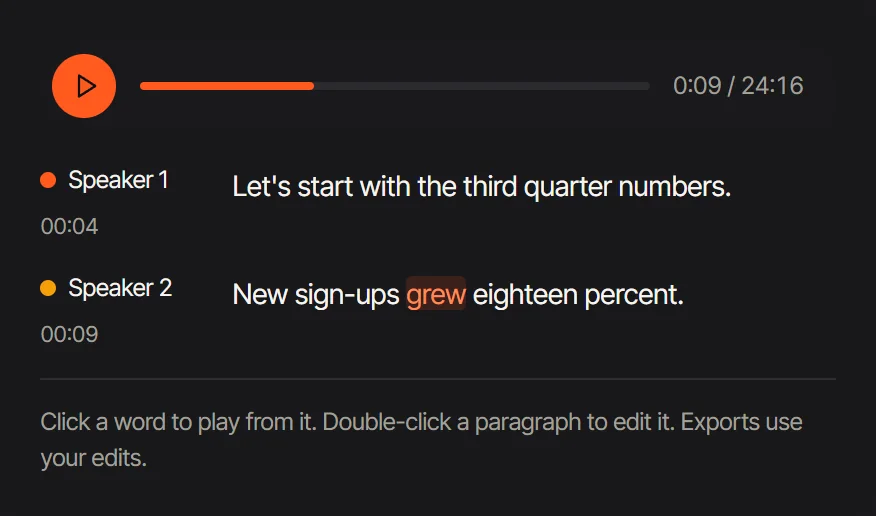 Click any word to play the audio from that moment; each paragraph shows its speaker and start time.
What it costs
Transcription uses 2 credits per started minute, counted from the length of the file. A 2 minute 15 second lecture counts as 3 minutes, so 6 credits. Counted the same way, our nine sample recordings, 11 minutes 19 seconds in all, come to 30 credits, because every file rounds up to whole minutes. Joining short clips into one file before you upload saves those leftover seconds.
Can you transcribe audio to text free?
Yes, within limits. Typing by hand and built-in captions are free with no cap on minutes, as long as you can spare the time.
For AI transcription, a new Audio AI Studio account gets 60 credits once its email is verified, valid for 30 days. At 2 credits a minute, that covers 30 minutes of audio to transcribe audio to text free, with speaker labels and every export format included. After that, a one-time pack of 500 credits ($9.99) covers 250 minutes, about 4 cents a minute. Plans and packs are on the pricing page.
If your audio is inside a video
The transcriber takes audio files, so a video needs one quick step first. Open it in Extract Audio from Video and keep the original sound: the audio track is copied out as it is, with nothing re-encoded, and for most phone videos the file it gives you is an M4A, which the transcriber takes as it is. If you want an MP3 instead, MP4 to MP3 makes one. Both run in your browser, so the video itself never leaves your device.
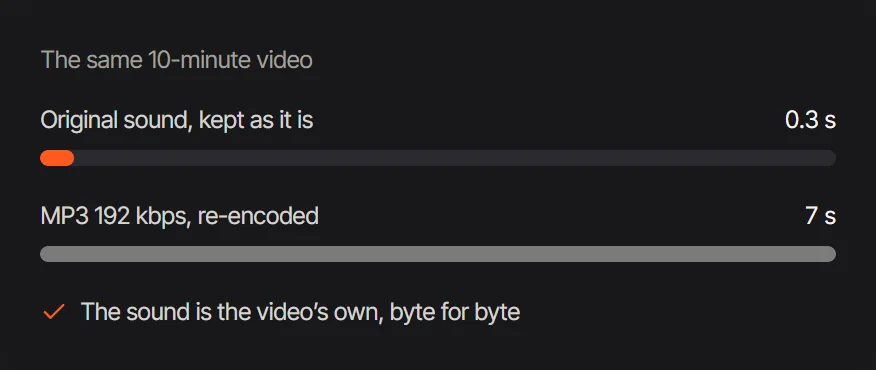 For the same 10 minute video, keeping the original sound takes 0.3 s and re-encoding to MP3 takes 7 s.
Record audio that transcribes cleanly
Most transcription mistakes start in the recording. These are the habits that make the biggest difference:
- Keep the microphone close. About a hand's width from the mouth beats a better microphone across the room.
- One voice at a time. Overlapping speech is the hardest part to transcribe and to label. Ask people to let each other finish.
- Cut the background noise. Fans, keyboards and traffic blur the quiet consonants that separate one word from another.
- Test a minute first. Record, listen back on headphones, then record the real thing.
If you don't have a recorder handy, the free online voice recorder records any microphone in your browser and saves an MP3. Each take has a Turn into text button that hands it straight to the transcriber, so there is no file to find and upload again.
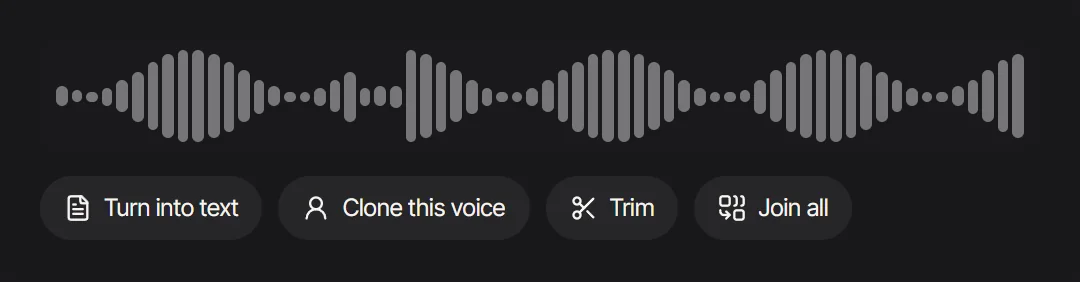 Under each take in the online voice recorder: Turn into text, Clone this voice, Trim and Join all.
Which export format to choose
| Format | What it holds | Use it for |
|---|---|---|
| TXT | Plain text, with speakers and times if you want them | Notes, quotes, search, pasting anywhere |
| DOCX | A Word document | Editing with comments and tracked changes |
| SRT | Numbered subtitles with start and end times | Video editors and most video platforms |
| VTT | Web subtitles with the same timing | Players and browsers on the web |
Subtitles need short lines to be readable. Our SRT and VTT exports break the speech into lines of up to 42 characters (16 in Chinese), two lines at most, paced to the speech; with several speakers, each subtitle also starts with the speaker's name. Our 29 second plant repotting tutorial came out as seven subtitles, none longer than 42 characters a line.
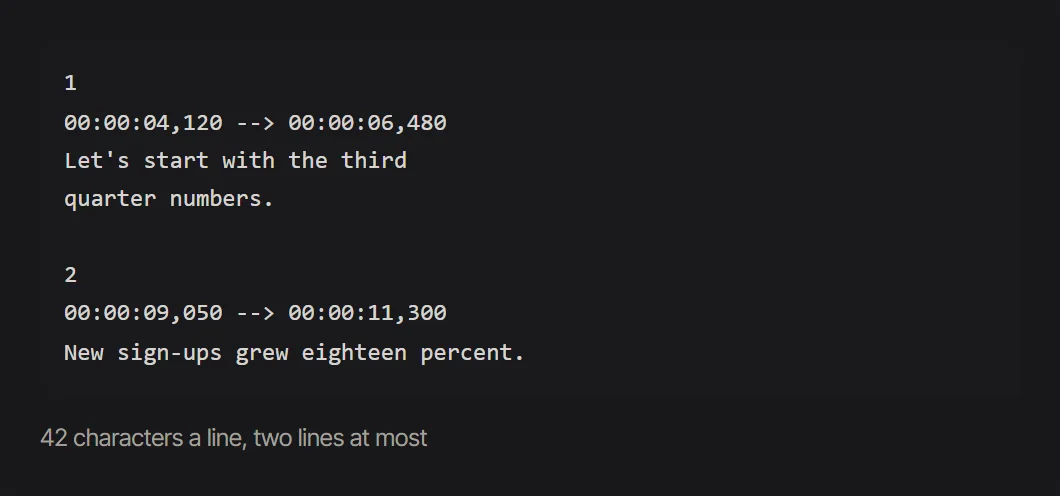 An SRT export: each subtitle has a number, a start and end time, and at most two short lines.
Consent and accessibility
Before you record a meeting or a call, tell everyone and get their agreement. In some places the law requires the consent of every person in a private conversation, so asking is the safe habit everywhere.
A transcript also makes your audio usable for more people. The Web Content Accessibility Guidelines (WCAG 2.2, success criterion 1.2.1) ask for "an alternative for time-based media" that "presents equivalent information for prerecorded audio-only content", and criterion 1.2.2 asks for captions for prerecorded audio in synchronized media, such as a video (W3C WCAG 2.2, checked 2026-10-29). Publishing a podcast transcript or video subtitles covers both.
FAQ
How long does it take to transcribe one hour of audio?
By hand, expect several hours: at 130 to 160 spoken words a minute, an hour of speech holds roughly 7,800 to 9,600 words. With an AI transcriber the transcript is ready in minutes, and your time goes into reading it through once.
Can AI tell different speakers apart?
Yes. Speaker labels are on by default, and each paragraph is marked Speaker 1, Speaker 2 and so on. Rename them once and every line updates. Voices are only told apart within one file, so the labels stay anonymous until you name them.
Which languages can I transcribe?
The language is detected automatically, or you can choose it. English, Chinese, Spanish and many other languages are supported. For a recording that switches between two languages, pick the one spoken most and check the other passages more closely.
Can I transcribe a video?
Yes, after one step: pull the sound out with Extract Audio from Video or MP4 to MP3, then upload the audio file.
Is my recording private?
Your recordings and transcripts are visible only to you and stay in your library for 30 days. Exports of your edited transcript are made in your browser.
Why does the transcript get some words wrong?
Unusual names, cross talk, background noise and a distant microphone cause most errors. Fix recurring names with find and replace, and click any doubtful word to hear it again.
Transcribe your first recording with Audio AI Studio
- Open Transcribe Audio and sign in. A new account gets 60 credits, enough for 30 minutes.
- Upload your recording, or record one with the online voice recorder and press Turn into text.
- Leave the language on automatic and speaker labels on, then start.
- Rename the speakers, fix any names, and click words you want to double check.
- Export TXT or DOCX to read, or SRT and VTT for your video.
Tools in this article
- Transcribe AudioTurn a recording into an editable transcript with speaker labels and word timestamps, then export TXT, SRT, VTT or DOCX.
- Extract Audio from VideoA video’s own sound track, copied out as it is, free in your browser.
- MP4 to MP3Turn the sound of an MP4 video into an MP3, free, right in your browser.