MP3 vs WAV: Which Audio Format Should You Use?
MP3 vs WAV tested on real files: size per minute, where each MP3 bitrate cuts the highs, when WAV is worth it, and the best audio format for each job.
Audio AI Studio7 min read
On this page
MP3 vs WAV comes down to one trade: a WAV keeps every sample of the sound exactly as it was recorded, while an MP3 leaves out the detail you are least likely to hear, so the same minute is 7 to 18 times smaller. Keep WAV while you record, edit and mix. Share and play MP3.
That is the short answer. To put real numbers on it, we converted the samples on our own converter pages and measured every file: the size, and where the high frequencies end. Everything below comes from those files.
MP3 vs WAV at a glance
| WAV | MP3 | |
|---|---|---|
| Compression | None: every sample is stored | Lossy: detail masked by louder sound is left out |
| One minute of stereo | 10.6 MB at CD quality (16-bit, 44.1 kHz); 17.3 MB at 24-bit, 48 kHz | 0.96 MB at 128 kbps to 2.4 MB at 320 kbps |
| Highest frequencies | Up to half the sample rate | Cut off lower at lower bitrates (16.7 to 20.5 kHz in our test) |
| Editing | Edit and save as often as you like | Every new encode makes its own cuts again |
| Largest file | 4 GB at most (about 6 h 45 min of CD-quality stereo) | Rarely an issue: an hour at 192 kbps is about 86 MB |
| Plays on | Computers, editors, most players | Practically every phone, car and player |
| Best for | Recording, editing, mixing, masters, video projects | Listening, sharing, podcasts, voice notes |
What we measured: one WAV at four MP3 bitrates
We made a 30 second instrumental as a 24-bit, 48 kHz stereo WAV for our WAV to MP3 converter page, then converted it there at all four bitrates the converter offers. The converter runs in the browser with the LAME MP3 encoder at a constant bitrate. To find where each file's high frequencies end, we averaged its spectrum over the whole file and noted the first 100 Hz band that falls 30 dB below the level at 10 to 15 kHz.
| File | Size for 30 s | Per minute | Smaller than the WAV | Highs end at |
|---|---|---|---|---|
| WAV, 24-bit, 48 kHz | 8.64 MB | 17.3 MB | 24 kHz (all the way up) | |
| MP3 128 kbps | 481 KB | 0.96 MB | 18 times | 16.7 kHz |
| MP3 192 kbps | 721 KB | 1.44 MB | 12 times | 19.0 kHz |
| MP3 256 kbps | 962 KB | 1.92 MB | 9 times | 19.7 kHz |
| MP3 320 kbps | 1.2 MB | 2.4 MB | 7.2 times | 20.5 kHz |
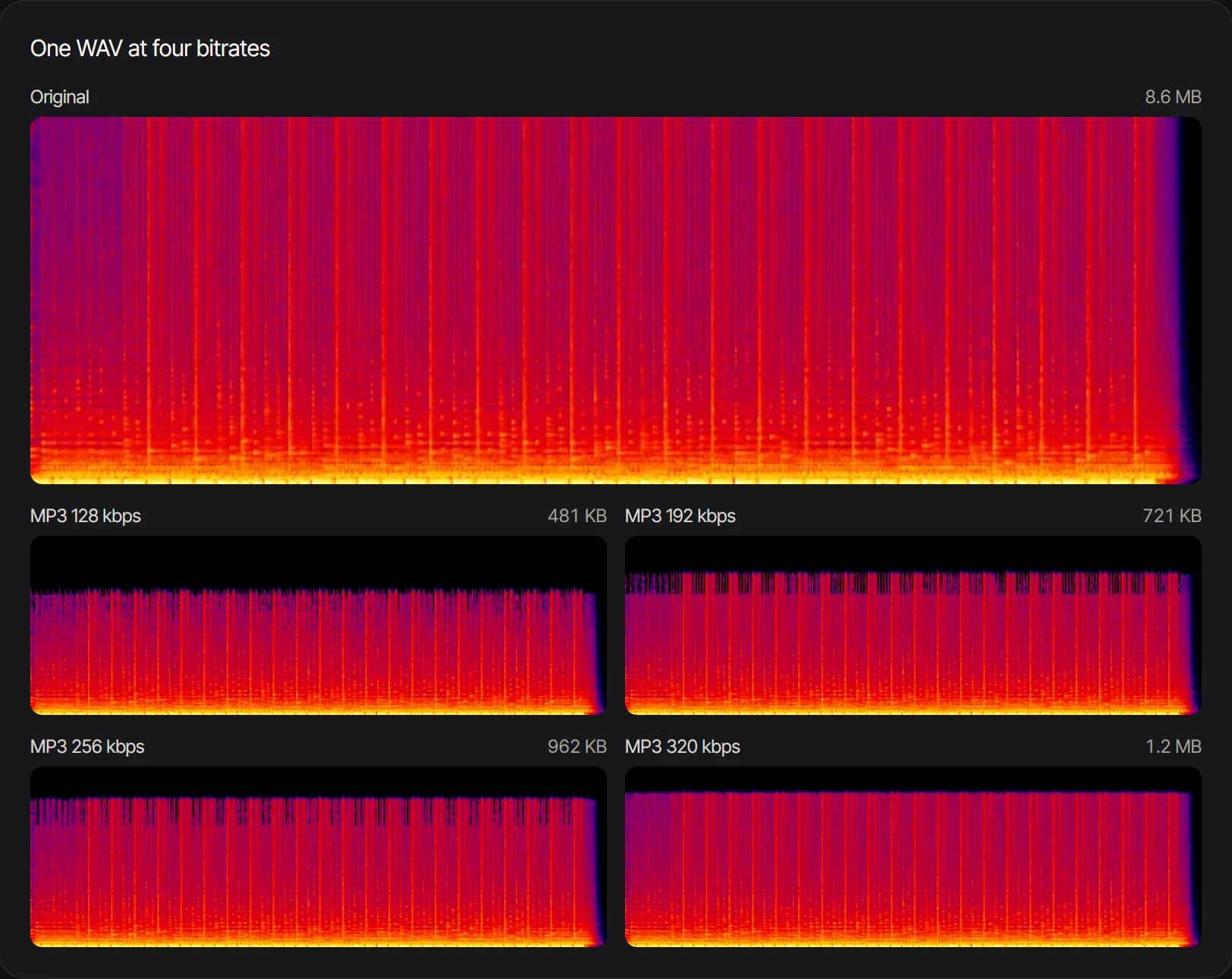 The same 24-bit WAV and its four MP3s: the coloured area is sound, and the lower the bitrate, the lower the highs stop.
Two things stand out. First, the size of an MP3 depends only on its bitrate and length: 128 kbps is always about 0.96 MB a minute, whatever the music. Second, each step down in bitrate trims the top of the spectrum. Everything below about 16 kHz is still there even at 128 kbps.
The trimmed part is small. In this instrumental, which was made to have plenty of highs, everything above 16 kHz held 0.17% of the sound's energy. In a voice recording it is far less.
Speech: a mono 128 kbps MP3 is plenty
Our podcast sample is two voices in a mono 16-bit, 44.1 kHz WAV. As a 128 kbps mono MP3 it is 5.5 times smaller (2.6 MB down to 481 KB for 30 seconds). Its spectrum follows the WAV's within about 1.5 dB all the way up to 20 kHz, and only 0.007% of the voice's energy was above 16 kHz to begin with.
That is why our converter suggests 128 kbps for mono recordings. A voice has very little up there to lose, and a 128 kbps mono MP3 is half the size of a 256 kbps stereo one.
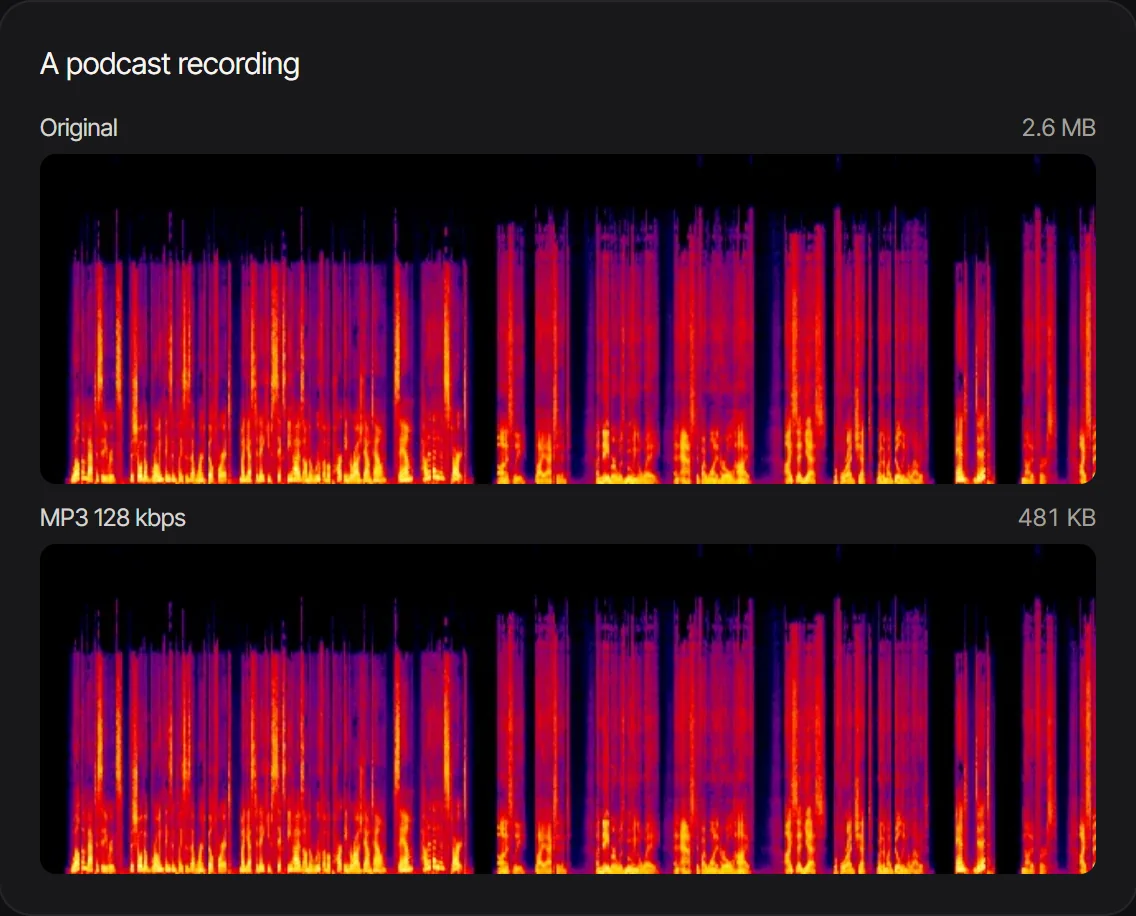 A mono podcast take as WAV and as a 128 kbps MP3: the two spectra look the same, at about a fifth of the size.
MP3 bitrate: which one to choose
MP3 bitrate is the amount of data used for each second of sound, in kilobits per second. Higher means a bigger file and more of the highs kept. Our converter offers four constant bitrates and suggests one from the source:
| MP3 bitrate | Per minute (stereo) | Highs end at (our test) | Use it for |
|---|---|---|---|
| 128 kbps | 0.96 MB | 16.7 kHz | Speech, podcasts, lectures, voice notes (mono) |
| 192 kbps | 1.44 MB | 19.0 kHz | Music for everyday listening; our default |
| 256 kbps | 1.92 MB | 19.7 kHz | Demos and reference mixes |
| 320 kbps | 2.4 MB | 20.5 kHz | Finished music from a WAV or other lossless source |
The converter suggests 320 kbps when the source is lossless (WAV, FLAC or ALAC), 128 kbps when it is mono, and 192 kbps otherwise. It also warns you when the bitrate you pick is well above the source's: a 128 kbps MP3 saved again at 320 kbps only gets bigger, because the highs it lost the first time don't come back.
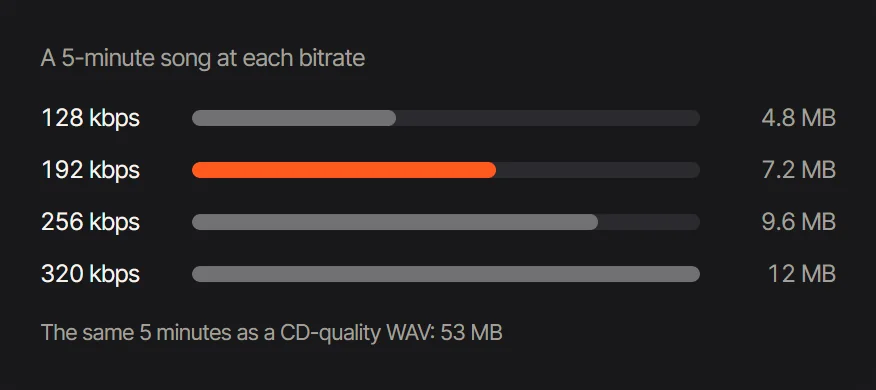 A 5 minute song at each bitrate: 4.8 MB at 128 kbps up to 12 MB at 320 kbps, against 53 MB as CD-quality WAV.
When WAV is the better choice
WAV is worth its size whenever the file is not finished yet.
- Editing and mixing. Every time an MP3 is decoded, changed and encoded again, the encoder makes its own cuts again, and the losses add up. A WAV can be edited and saved any number of times without that.
- Loops and exact timing. MP3 encoders add a little silence at the start and end of the file. Our MP3 to WAV converter removes it: a four bar loop that is 9.600 seconds long as an MP3 comes out at exactly 9.600 seconds as WAV, so it repeats without a gap.
- Video projects. Video editors usually work at 48 kHz. When you convert an MP3 voiceover to WAV for a video, our converter can resample it to 48 kHz on the way.
- Masters and archives. Keep the WAV of anything you recorded or mixed yourself. You can always make an MP3 from it, never the other way round.
Keep one limit in mind. A WAV stores its size in a 4 byte field (Microsoft Learn, RIFF, checked 2026-10-29), so a standard WAV stops at 4 GB. That is about 6 hours 45 minutes of CD-quality stereo, or about 4 hours 8 minutes at 24-bit, 48 kHz.
Does converting MP3 to WAV improve quality?
No. Converting MP3 to WAV makes the file bigger without adding anything back. Our 30 second song sample was a 192 kbps MP3 of 722 KB; as a 16-bit WAV it became 5.3 MB, 7.3 times larger. Its highs still end at 18.6 kHz, exactly where the MP3 cut them.
MP3 to WAV is still useful when a program only accepts WAV, or when you want exact timing for loops and editing. It just can't restore what the MP3 left out.
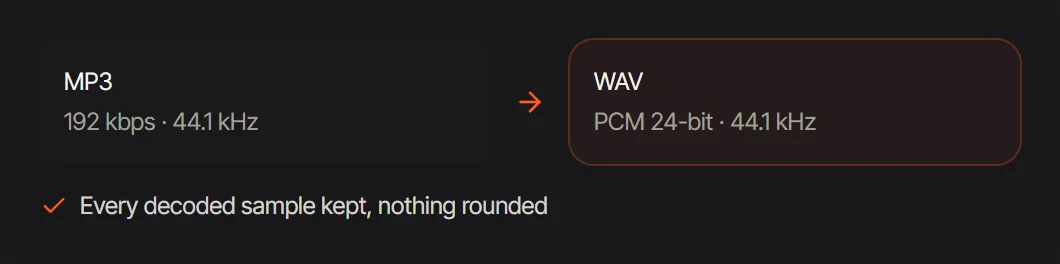 MP3 to WAV keeps every decoded sample in a 24-bit WAV; the sound is the MP3's, nothing more.
The best audio format for each job
| What you are doing | Best format | Why |
|---|---|---|
| Recording voice or instruments | WAV, 24-bit | Room to fix levels later, nothing lost |
| Editing, mixing, mastering | WAV | Save as often as you like without new losses |
| Music for listening and sharing | MP3, 192 to 320 kbps | Small, plays everywhere, highs kept to 19 to 20.5 kHz |
| Podcasts, lectures, voice notes | MP3, 128 kbps mono | A voice loses next to nothing; under 1 MB a minute |
| Video projects | WAV, 48 kHz | Matches the video editor's rate |
| Sending a file by message or email | MP3 | A 5 minute song is 7.2 MB at 192 kbps instead of 53 MB |
FAQ
Is WAV better quality than MP3?
A WAV holds the sound exactly as recorded; an MP3 is a smaller copy with some detail left out. Whether you hear a difference depends on the bitrate, the sound and the listener. In our test a 320 kbps MP3 kept everything up to 20.5 kHz and a 128 kbps MP3 everything up to 16.7 kHz.
Why is my WAV file so big?
Because nothing is compressed. CD-quality stereo is 44,100 samples a second, 16 bits each, on two channels: about 10.6 MB a minute. At 24-bit, 48 kHz it is 17.3 MB a minute.
What is the best MP3 bitrate?
320 kbps for finished music made from a lossless source, 192 kbps for everyday listening, and 128 kbps for speech, ideally mono. Picking a bitrate higher than the source's only makes the file bigger.
Can I convert MP3 to WAV without losing quality?
Yes: converting MP3 to WAV keeps every decoded sample, so nothing more is lost. But nothing is gained either: the WAV sounds exactly like the MP3, at several times the size.
Which is better for a podcast, MP3 or WAV?
Record and edit in WAV, publish as MP3. A 128 kbps mono MP3 of our podcast sample was 5.5 times smaller than the WAV with a near identical spectrum.
Do I lose quality converting WAV to MP3 more than once?
Converting the same WAV again simply gives you another first generation MP3. The losses add up when you convert an MP3 into a new MP3, so always encode from the WAV.
Convert WAV to MP3 with Audio AI Studio
- Open WAV to MP3 and add one or more WAV files. They stay on your device; the converter runs in your browser.
- Look at the size each bitrate would give your file, and pick one: 320 kbps for finished music, 192 for listening, 128 for speech.
- Convert and save. On a desktop, an hour of WAV becomes an MP3 in about 27 seconds.
- Going the other way? MP3 to WAV makes an editable WAV, and the MP3 converter turns M4A, FLAC, OGG and video sound into MP3.